Fields
Array Builder Field
Captures repeatable array data in an action form. Useful for collecting lists of structured values that can be saved to JSON in stub data.
If you're new to arrays, see arrays for a fundamental overview.
Basic Usage
The arraybuilder field lets you collect multiple values as an array within an action.
You define the structure of each array item using the new_entry_field parameter. This can be almost any field type in Stubber.
Example
Result
In the form, this field will appear as a list where users can add multiple entries.
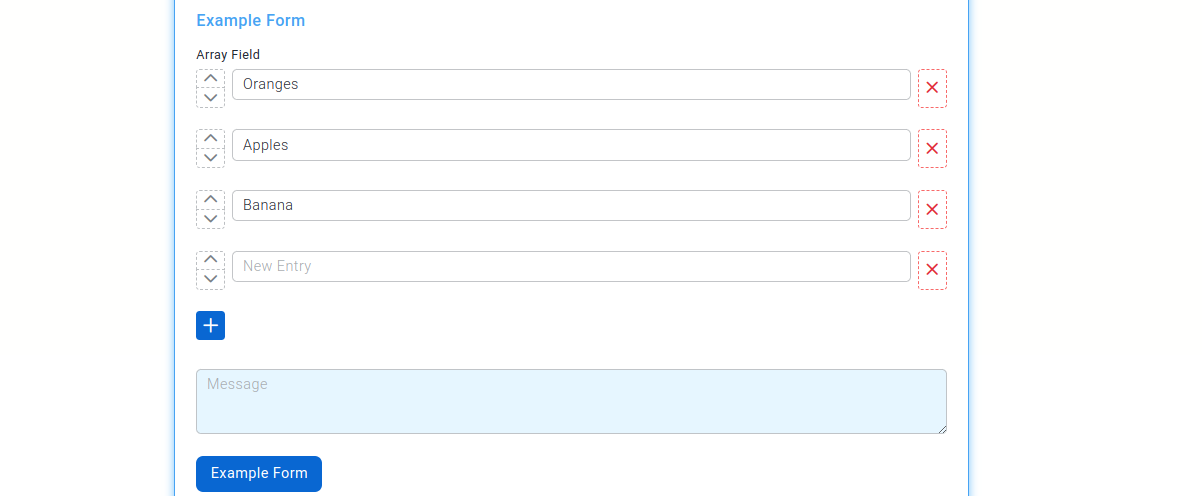
The resulting data in stubpost.data will look like this:
You can reference this data using substitution, for example:
~~stubpost.data.customer_names
Parameters
See fields for common field parameters such as validation and conditional rendering.
params.new_entry_field optional object
Defines the field used to generate each item in the array.
This is a full field configuration and can be any supported field type. The structure of this field determines the structure of each item in the resulting array.
Examples
Using a Simple Field (Email)
In this example, new_entry_field is set to an email field. Each item in the array will be a string representing an email address.
Result
Using a Section Field
In this example, new_entry_field is set to a section. Each item in the array will be an object containing multiple fields.