Concepts
LIDs
Explains Link IDs as which allow passing data _by reference_ inside the Stubber system
Overview
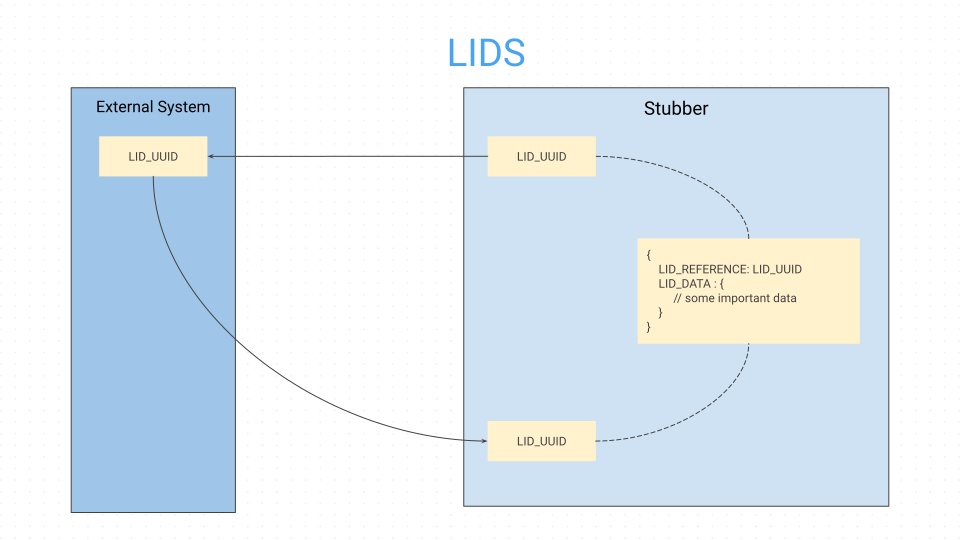
- LIDs are identifiers for a piece of data that is stored inside the Stubber system
- When you create a lid you receive a short id
- This short id (LID) can be used to reference the data that was stored when the lid was created
- LIDs are used when you wish to attach data to something while keeping it inside stubber
- LIDs work natively with Webhooks and Stub URLs
Details
Passing data around by reference is useful when you want to pass data to a stub page or webhook without having to include the data in the URL or request body. Instead, you can create a LID that stores the data with a TTL and then reference that LID in your URL or webhook.
When a LID is created, it is stored in the Stubber system and can be accessed later using the LID reference. This allows for more efficient data handling and can help keep URLs and requests cleaner and more manageable.
LIDs are by default ephemeral and will expire after a certain amount of time
Uses
- You can use a lid to store data that you wish to reference inside a URL
- You can use a lid to store data that you wish to reference inside a webhook
Enabling
LIDs are disabled by default in most systems. In any system where LIDs are disabled by default, they can be enabled by setting the
top level parameter enable_lids to true.
Examples
Create a LID and then reference it in a Stub URL
- Use the create_lid task to create a LID with some data.
- Use the stuburl helper to reference the LID in a URL.
- The Stubber page that is accessed via the URL, will have access to the LID data, by way of the LID reference.