Notification Parameters
Chat Rating
Explains how to ask a Webchat user to rate the conversation by sending a chat rating control event. Useful for collecting thumbs up or thumbs down feedback and reading the vote on the stub.
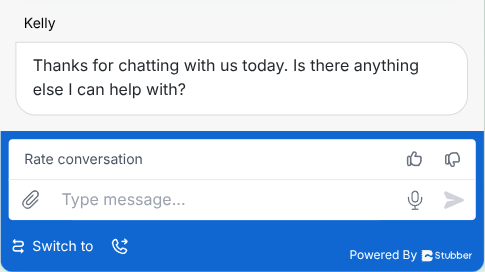
Send a _stubber_webchat_chat_rating control event. The webchat client shows a Rate conversation prompt with a thumbs up and a thumbs down button in the input bar, above the text area. The control event takes no parameters.
Behaviour
- The prompt stays in the input bar until the user picks one of the two options
- Once an option is picked the prompt disappears - the user cannot change the rating
- To ask for another rating, send the control event again
Reading the rating
Picking an option sends a control event back to the stub. It arrives like any other webchat update, with an empty webchat_message and the vote under webchat_control_event._stubber_webchat_chat_rating.
A thumbs up sets up_vote:
A thumbs down sets down_vote:
~~stub.data._incoming_webchat_data.webchat_control_event._stubber_webchat_chat_rating.up_vote is true for a thumbs up, and ~~stub.data._incoming_webchat_data.webchat_control_event._stubber_webchat_chat_rating.down_vote is true for a thumbs down. Only the option that was picked is present.
The rating reaches the stub without any message text. If your template replies to every webchat update, add a condition so it does not respond to a rating as if it were a message.