Templates
Template Branch Data
Template branch data is branch-specific JSON available under template.branch_data for environment variables, API URLs, credentials, and draft/live configuration.
Template branch data lets you define different values for each branch of a template, then access the value for the current branch from one consistent path.
This is useful when a template needs different configuration in draft and live, such as API URLs, credentials, email addresses, or feature flags.
Details
Template branch data is located under the path template.branch_data.
The stored structure is grouped by branch name. When you substitute from template.branch_data, Stubber resolves the value from the branch currently being used by the stub.
For example, instead of storing separate values like template.data.settings.draft_apiurl and template.data.settings.live_apiurl, then conditionally choosing between them, you can store both values under template.branch_data and use template.branch_data.apiurl.
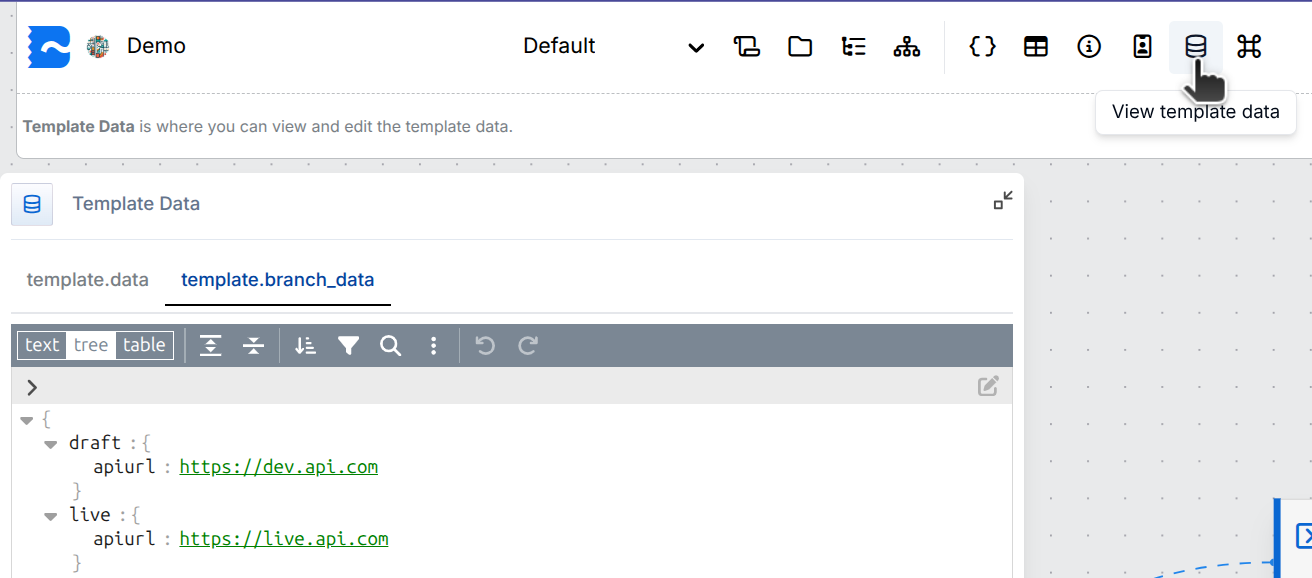
Example structure
With this structure:
- A stub on the draft branch resolves
template.branch_data.apiurltohttps://dev.api.com. - A stub on the live branch resolves
template.branch_data.apiurltohttps://live.api.com.
Uses
- API Endpoints: Use a testing API on the draft branch and a production API on the live branch.
- Environment Variables: Store branch-specific values without adding conditions throughout the template.
- Credentials: Reference different branch-specific credentials from a single substitution path.
- Notifications: Send draft and live notifications to different channels, addresses, or profiles.
Example interpolation
Once template branch data is set, you can use variable substitution to interpolate the current branch value.
You can also use the Handlebars substitution format:
When to use template branch data
Use template.branch_data for values that should change based on the current branch.
Use template data for values that should stay the same across branches, or for shared template-wide configuration.
Viewing Template Branch Data
You can view the full structure of the template branch data by clicking on the View Template Data button.
This will open a sheet with a tab for the template.branch_data structure.