GPT Chat Task (LLM Task)
Examples
In these examples, the wider picture of what happens will be shown, as the most important part of the task result is the assistant's response message, and that is fairly simple to understand. Which parameters to use in which scenario is the secret sauce of this task.
Greet new user with the weather
We have an action called greet_new_users with the gpt_chat_task definition below.
The task definition:
The assistant calls a Stubber action get_current_weather to get the weather in a location, and then generates a welcome message which includes the weather. This requires an action, get_current_weather, with the action_meta field ai_function_calling set to true and a text field with the name location available on the stub in the correct state.
For our get_current_weather action, we added a task with an API call to api.weatherapi.com. This task is as below:
We added an api key for api.weather.com in our stub data. As for the {{stubpost.data.location}}, when the assistant decides to call a function, the properties that the assistant uses to call the function are added to the stubpost.data of the action that the Stubber system runs on behalf of the assistant. So the stubpost.data.location value will come from the assistant.
Result
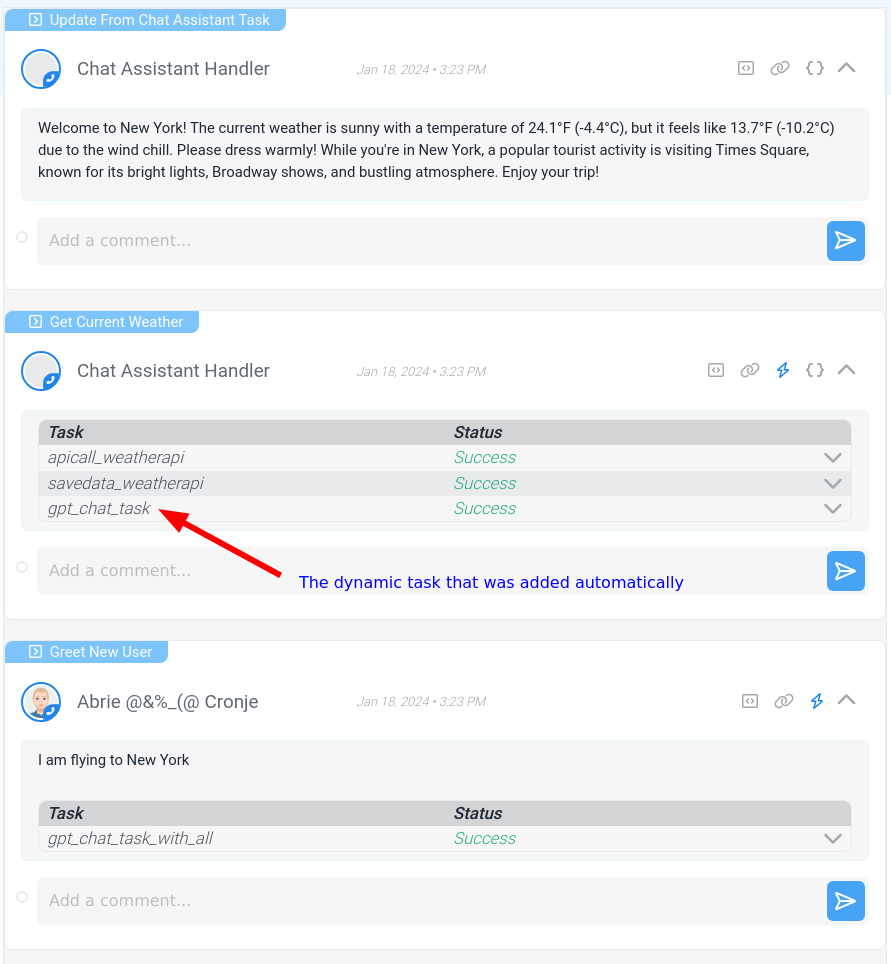
Note that in the order of things happening below, the disable_model_response: true parameter ensures that there would not be an additional assistant response between steps 2 and 3. Sometimes the assistant informs the user that it is going to call a function before actually calling the function.
The order of things happening in this example is as follows:
- We run the
greet_new_usersaction with the message "I am flying to New York". - The action runs the
gpt_chat_taskdefined above, calling the assistant. - The assistant responds that the action
get_current_weather, with the location parameter set to "New York", should be ran. The dynamic task that will return the result of the action to the assistant is added to theget_current_weatheraction request. - The Stubber system automatically runs the
get_current_weatheraction, and thus the task that makes an api call toapi.weather.com. - The dynamic task returns the entire
stubpostof theget_current_weatheraction as a appended message to the assistant. - The assistant generates a greeting response as instructed in the system message, this response is added to the stub via the task feedback action,
_update_from_chat_assistant_task.
Here is a screenshot of the flow in Stubber:
Force the model to respond in Json only
This is only available for select models. You have to mention the word "json" in the system message, or the task will error.
The task definition:
Result
Here follows the result with the stubpost message as "Create a recommended people structure for my company, "The Pink Factory". We have technical, operations, support and sales teams with 5, 5, 10, 10 members in each respectively."