Manage
Files
Explains organization file access, lifecycle settings, and file extension policies. Useful for managing uploaded file visibility, archive rules, delete rules, retention behavior, and allowed or blocked file types.
Overview
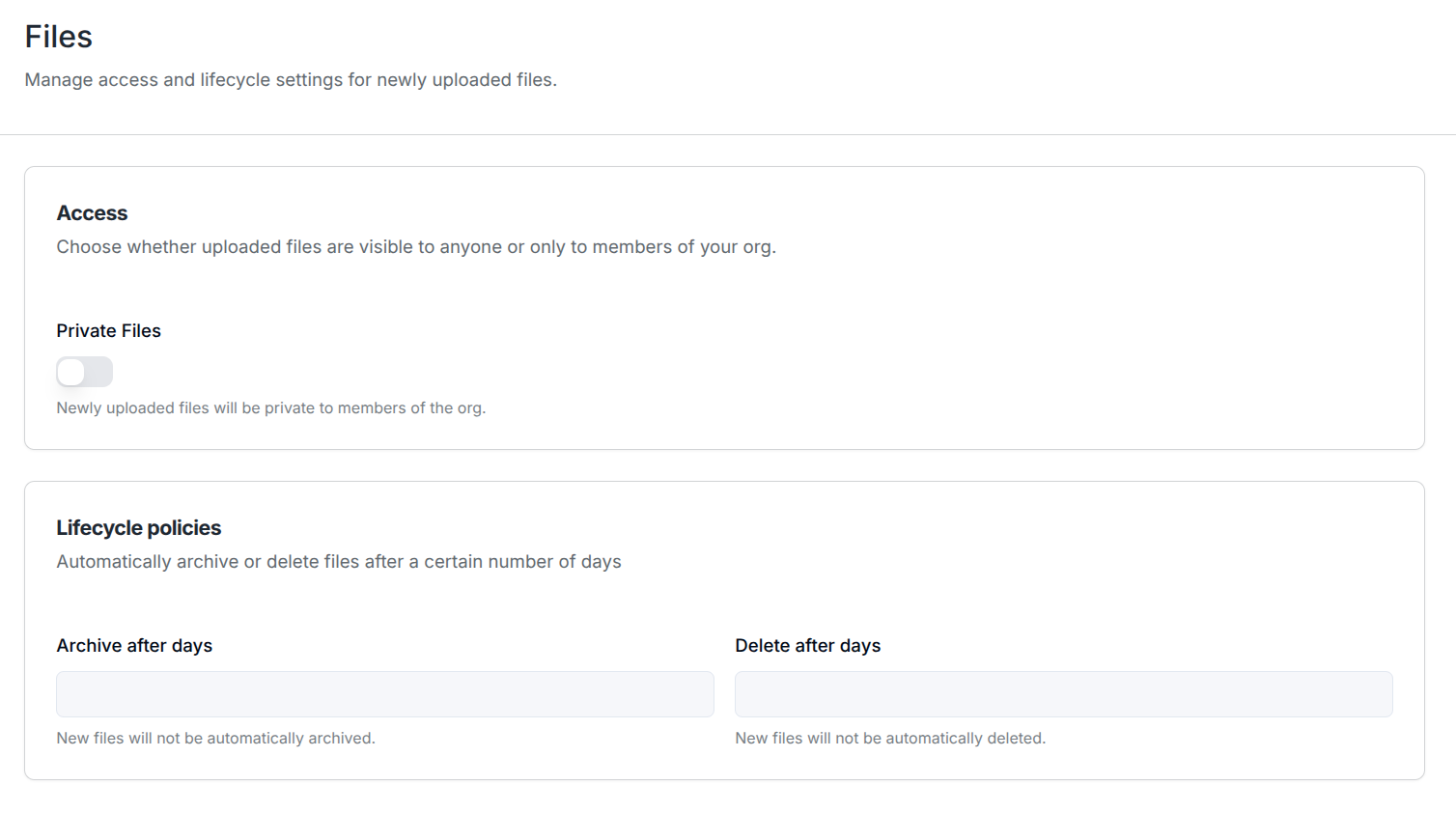
The Files settings page lets you define the default behavior for files uploaded in your Org.
In the Manage platform, you can configure these settings in the Files section.
These settings help you control the visibility, life cycles, and permitted extensions of uploaded files without having to configure each file manually.
Available Settings
The page contains three groups of settings:
- Visibility controls whether newly uploaded files are visible to anyone or only to members of your Org.
- Lifecycle policies control whether newly uploaded files are automatically archived or deleted.
- File extension policy controls which file extensions can be uploaded.
Visibility
Under Visibility, you can enable the Private Files toggle.
- When enabled, newly uploaded files are only visible to members of your Org.
- When disabled, newly uploaded files are not restricted by this Org-only privacy setting.
Lifecycle Policies
Under Lifecycle policies, you can configure automatic retention rules for newly uploaded files.
Archive and Delete Settings
Underneath each lifecycle section, you can configure the following settings:
After Creation: The number of minutes after a file is uploaded that it should be archived or deleted.After Last Access: The number of minutes after a file is last accessed that it should be archived or deleted.
If only After Last Access is configured then file creation counts as the initial access event, and the retention period is calculated from the file's creation time.
File Allow and Blocklist
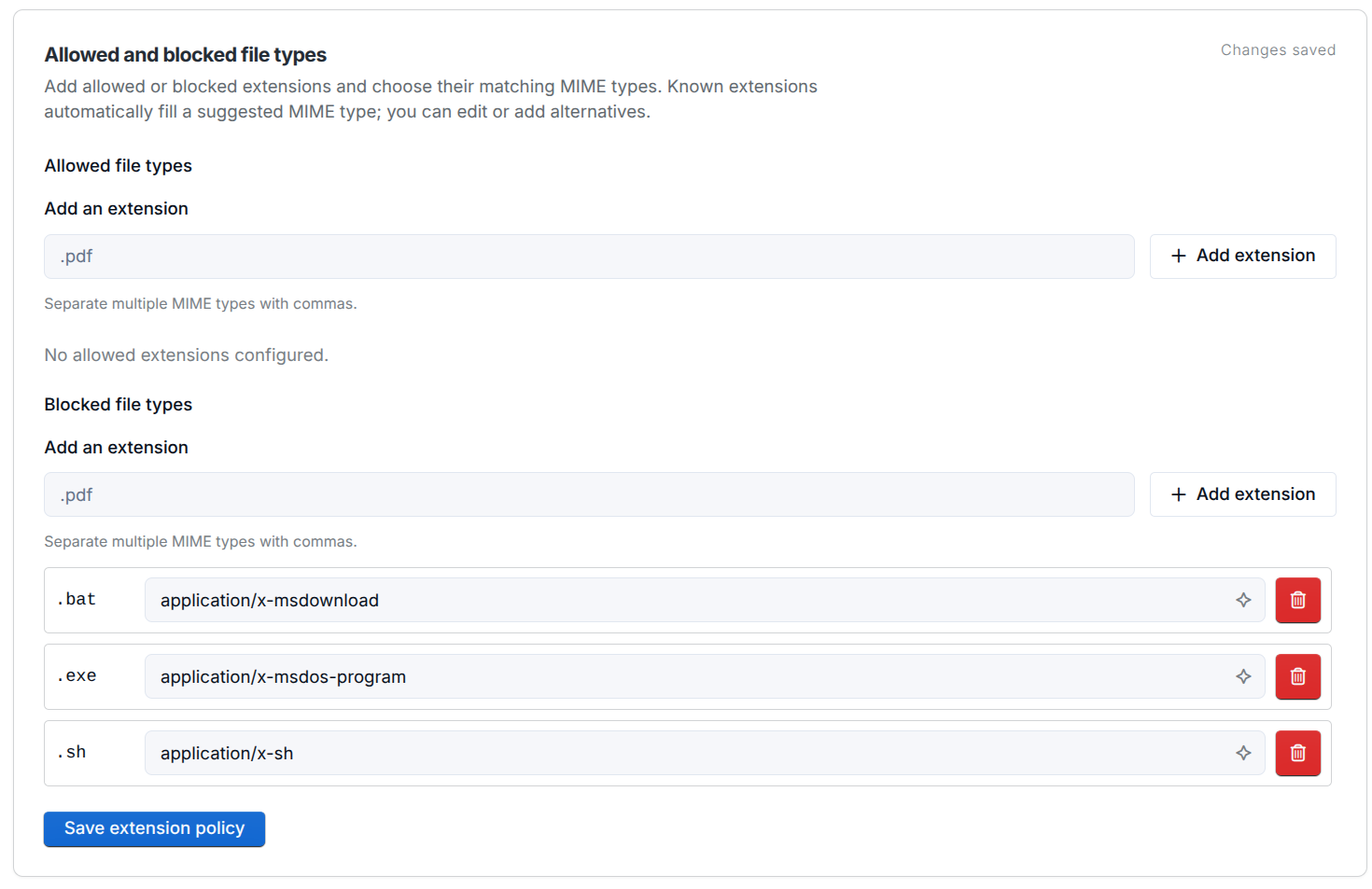
Under Allowed and blocked file types, you can restrict uploads by adding file extensions and configuring their matching MIME types.
To add a file type:
- Enter an extension, such as
.pdf, in the Add an extension field under Allowed file types or Blocked file types. - Click Add extension to add it to the list.
- Review the MIME type in the extension's row. Known extensions automatically fill a suggested MIME type, which you can edit or supplement with alternatives. Separate multiple MIME types with commas.
- Click Save extension policy to save your changes.
To remove an entry, click the trash icon beside its row, then save the policy.
Allowlist
Add extensions under Allowed file types to populate the allowlist. When the allowlist is populated, only files with one of the listed extensions may be uploaded. Leave it empty to allow extensions that are not otherwise blocked.
For example, add .pdf, .docx, and .png as separate entries to allow uploads with those extensions.
Blocklist
Add extensions under Blocked file types to populate the blocklist. Files with an extension in the blocklist are always rejected. This applies even when that extension also appears in the allowlist.
For example, the screenshot shows separate entries for .bat, .exe, and .sh, each with a matching MIME type.
Notes
- Changes affect only newly uploaded files.
- Leaving all lifecycle fields empty disables automatic archiving or deletion for new uploads.
- Leaving both the allowed and blocked file type lists empty allows uploads of any file extension.