Public Forms
Public Form Layouts
Explains public form layouts for wrapping rendered action fields in custom HTML. Useful for branded forms, custom submit pages, and user-facing public form design. The form fields are injected automatically via the <FormFields /> placeholder.
Layouts are managed from the editor under Public Form Layouts. To create one, open the drive and create a new Public Form Layout file.
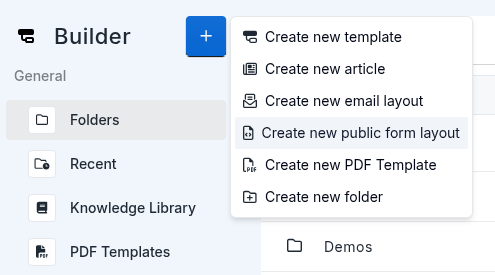
Once created, link it to an action via the publicformlayoutuuid field in the action's public_form meta:
The layout has two environments — draft and live — allowing you to iterate on the design and publish when ready.
Preview Links
You can preview a layout directly in the browser without needing a stub. Use the following URL format:
layout_branch=draftrenders the current draft version of the layout.layout_branch=liverenders the published live version.
The layout UUID is shown in the editor when the layout file is open. Preview links are useful for testing the visual design and variable interpolation before linking the layout to an action.
Variables
You can pass variables into the layout via public_form_variables in the action meta. These are interpolated into the layout HTML using {{public_form_variables.key}} syntax.
In your layout HTML, reference them like this:
Variable values themselves support Stubber interpolation, so you can embed dynamic values like {{stub.stubref}} directly inside them.
Form and Post-Submit Divs
The layout uses two special id-tagged divs to control what the user sees before and after submission:
_stubber_form— contains the form fields and submit button. This is the div that is displayed while the form is active._stubber_post_submit— contains whatever you want to show after the form is successfully submitted (e.g. a confirmation message, a link, or any custom HTML). You can design this div however you like.
Stubber automatically toggles visibility between these two divs using display: block and display: none — the form div is hidden after submission and the post-submit div is shown in its place.
Custom Submit Button
By default, the form renders a submit button automatically. If you want to provide your own styled button, add a button with the id _stubber_submit_button anywhere inside your layout. When Stubber detects this id, it will use your button instead of the default one.
Example Layout
Here's an example layout using variables for the title and description: